Training AI models is now so easy a child can do it
This article was originally published on Medium.
We had a day at home last week with no plans so I introduced my children to machine learning and delightfully we were able to make almost every mistake in data science. Initially it was too fun to use the model, but very quickly they got the hang of improving the data and tuning the model. The ethical, environmental and practical draw backs of AI keep me awake at night, but with a boost in data science education maybe we can teach the next generation to apply machine learning in an sustainable and equitable way.
It may come as no surprise that we have a very geeky household and that my girls have been coding for years. Resources like Scratch and Scratch Junior along with school code clubs have made programming incredibly accessible. Both my girls are massive nerds and will spend hours with their tablet making little games or animations through programming. They are aged 7 and 9 with the younger one never far behind her sister, often offering helpful advice over her shoulder.
The Raspberry Pi foundation now offer a free AI and machine learning course aimed at anyone who wants to have a go at machine learning for the first time. Well we all had a cold at the weekend so we shelved the plan to go to the skate park and gathered around my laptop in the kitchen to give the girls their first taste of machine learning.
Week one of the Raspberry Pi course uses the online machine learning tool Teachable Machine to train an model to play rock, paper, scissors. This model can then be deployed into a scratch program to play the game for real. I won’t reproduce the step-by-step here, you should sign up for the course if you want that information. Below is a screenshot of the interface for training the model. You create three classes: rock, paper, scissors, you capture your training data, then train the classifier using that data. This is an example of supervised learning. If you don’t know what that is then check out one of my earlier articles.
The interface makes this super easy with a button to press to capture images from your webcam for training and testing the model. My youngest went first. Rock and paper are easy, but if you are seven, making the scissors gesture is a little more tricky. We got some data however and clicked to train the model.
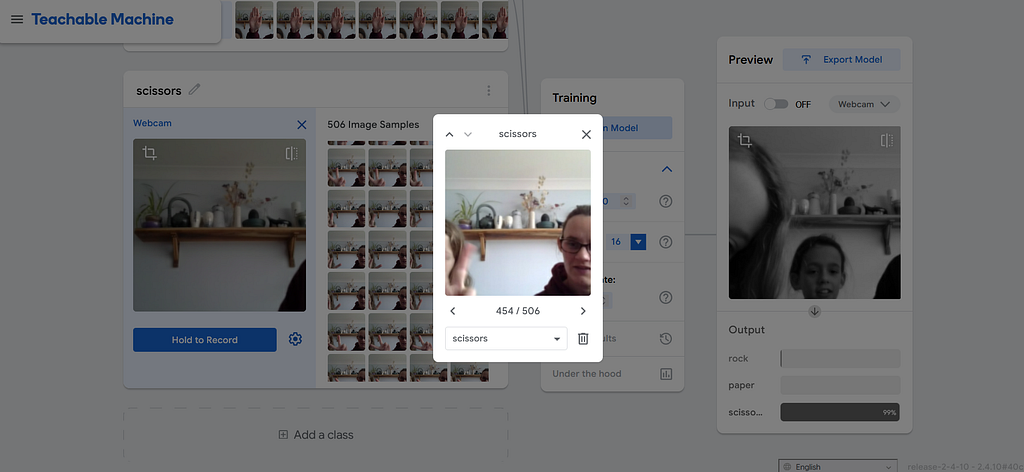
The results were quite good and the girls were thrilled. There is some excitement involved in seeing yourself on the screen and being allowed near mummy’s laptop, but once that had calmed down we were able to see that the model was mostly right. Success!
Since the model has been trained with data from my youngest only it was not a big surprise that it worked better for her than for my eldest or for me. We spotted other problems too. When the girls get excited they move closer to the camera and when they jostle each other they move further away. Both these effects caused the performance of the model to degrade.
Issues with round one:
- The training data had failed to capture the diversity of the people using the model so we had an imbalanced data set: training data was generated by just one person who didn’t represent the whole group.
- The training data had failed to capture real life conditions: the data was captured in calm settings, but the model was used in states of excitement and stress
So next we went back to our data and added more pictures of rock, paper, scissors from my eldest and me. We also make sure we moved around a lot more, capturing data for different angles and depths. My youngest was worried that the algorithm was picking up our heads and not our hands so we make sure we had some pictures without our faces. This was a really key observation: AI models are trained on all the data you give it. It is really easy to inadvertently introduce bias or false correlation in the models with something that a human would never notice. Were we pulling different faces for rock, paper, or scissors? My girls frown in concentration when making scissors so it is possible that we’ve trained the model to recognize a frown as scissors.
The new model came back more quickly than we could make a cup of tea and it seemed to perform better than the last one. It was much better at correctly identifying the move made by my eldest. We still had problems with scissors though. The girls has not noticed and important cultural difference: I make scissors like a Startrek four-fingered peace sign whereas my girls go for a more conventional two-fingered peace sign. I had not added many pictures of scissors myself since everyone was getting impatient to train the next model so the model was still not very good at picking up my scissors.
We also found that when we held our hands near the bottom of the screen the model usually identified them as scissors, irrespective of the form. This was because the girls liked to position their hand with just the fingers showing for scissors and they moved around a lot when training, but they held their hand up nicely for testing. The model incorrectly learned that a hand near the bottom of the frame was scissors.
Entertainingly we found that when we didn’t hold our hands up or even when we were absent from the frame, the model still chose scissors. This was because in some of the scissor images just a finger was visible so most of the frame hand no hands in. This meant that the model learnt that a frame with no visible hands was scissors.
Issues with round two:
- Cultural differences in how we represented scissors meaning the model was not able to correctly identify my scissors that were formed differently.
- Poor data collection for the scissors class: the data set contained empty frames, blurred frames, etc.
- Limited data variation where our hands were held at the bottom of the screen disproportionately for scissors instead of moving our hands around in different positions, which meant that the model learnt from this noise or the irrelevant information.
- Our model was applied to an inappropriate problem, out of scope of the original training data: identifying an empty frame where no move was played.
We went back to the data, removed the blurred or empty frames, added new images with a much wider variety of expressions of scissors. We also added a class which was invalid move in which no hands were visible or where they were not making rock, paper, or scissors. We retrained the data and got much better results.
This little game on a Sunday afternoon is in many ways very contrived, but it does highlight so many of the difficulties in training a deploying machine learning models. I wasn’t expecting the girls to behave so differently when training vs testing the data, but they did and it made a noticeable difference to the results: They found it exciting to see the images being generated so they moved around a lot more, but in testing they were very still, looking at the results from the model.
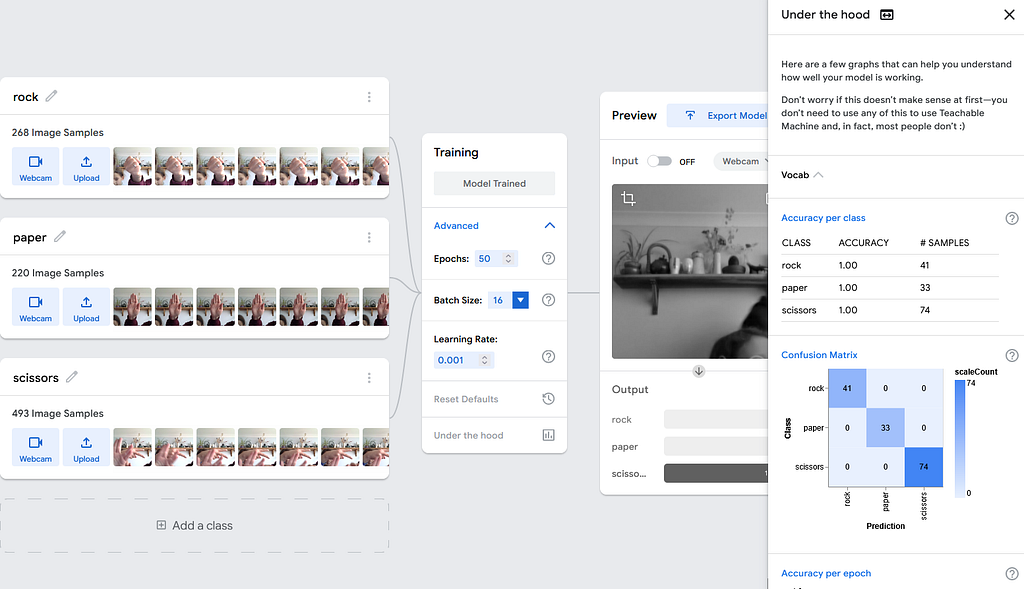
It was fun to see the results improve when we increased the amount of training data and quality of the training data. It was a bit too simple to play with over- vs under-fitting, where the model fits the training data too closely or not closely enough, but as we go through the training programme together I hope to be able to introduce some more complex concepts of data science to the girls. The training interface does let you look a little under the hood to see how the data has been partitioned for training and testing, for example. You can see the internal results such as the confusion matrix which is a common way of capturing incorrect classification. These results are based on the data we presented for training, not on the new data we generated when live testing the model so they don’t match our experience of testing the model, but interesting none the less.
At a high level the difficulties in testing and deploying an AI model into production are no different from deploying any other software product. You’ll be tripped up by false assumptions and corner cases whether you have an AI model or not. Putting the processes and technologies in place to cope when the model does not perform must be part of the product design. Deploying machine learning in real-world situations involves a wide skill set and experience to ensure data quality and correct application of appropriate algorithms. I was impressed however how the programme from Raspberry Pi managed to get us going so quickly and how easy it was to iterate and learn from the experience. We didn’t get to the point of deploying our model before the sun came out and we took a break for some fresh air, but we’ll come back to it another weekend.
For our game it was easy to see how problems with the data had caused issues with our model, but for most applications of AI, and certainly the really useful applications of AI, the data is too complex and the models too abstract to be able to simply eyeball the data and look for problems. I’m looking forward to digging into some of the more theoretical ways to apply machine learning effectively, as well as teaching the girls as little about what it means to deliver a product successfully. In the meantime it is amazing to see how quickly machine learning has become so easy a child can do it.